How to Choose the Best Mechanical Gaming Keyboard?
Choosing the best Mechanical Gaming Keyboard is less about chasing a popular switch and more about matching the board to your hands, games, and desk. Newzoo’s 2024 Global Games Market Report estimated 3.32 billion players worldwide and $187.7 billion in game revenue. That scale helps explain why gaming peripherals offer so many choices, but it does not prove one keyboard suits every player.
Custom-keyboard builder Taeha Types is known for detailed keyboard builds and practical demonstrations. A useful takeaway from his work is to judge a keyboard by its feel, sound, and everyday usability—not specifications alone. Treat that as a selection principle, not a verified verbatim quotation. Switch type matters: linear switches move smoothly, tactile switches provide a noticeable bump, and clicky switches add audible feedback. Try them in person if possible. A switch that feels crisp in a showroom may become tiring during a long session.
This guide compares switch feel, layout, build quality, latency, software, and price. It also considers details you can picture: a compact board beside a mouse, a spacebar that rattles, or a wrist resting against a tall case. Small things matter. Some advice online overstates tiny performance differences; real comfort varies between players. Use reliable product specifications and independent tests, then weigh them against your own experience. The right choice should feel dependable during play and comfortable after the match ends.
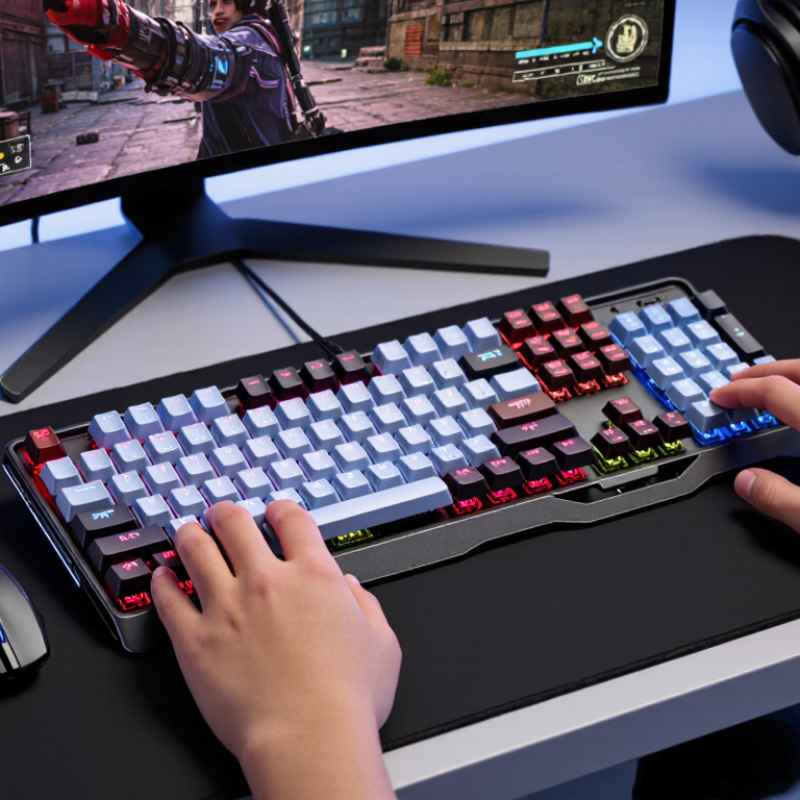
Define your gaming needs, desk space, and budget before comparing models
Before comparing mechanical gaming keyboards, define what you actually play. Fast competitive games may benefit from a compact layout that leaves more room for broad mouse movements. Strategy games or frequent chat may make dedicated arrow keys and a number pad more useful. The Entertainment Software Association’s 2024 Essential Facts report says 190.6 million Americans play video games weekly. That range of players is a reminder: there is no universal “gaming” setup.
Measure your desk before choosing a layout. Leave space for your mouse, and check whether the keyboard will sit comfortably in front of your monitor. OSHA’s Computer Workstations eTool recommends positioning the keyboard so your shoulders stay relaxed and your wrists remain straight. Try the position with your hands, not just a tape measure. A small mistake is easy to make.
Set a firm budget, including any accessories you genuinely need. Compare the total price with practical features: switch feel, noise, replaceable switches, and key layout. A loud click may feel satisfying at home but distract others in a shared room. No layout fits everyone; even this rule has exceptions. I would not choose extra features before checking desk space and play habits.
Compare switch feel and durability: CHERRY MX2A switches are rated for 100 million actuations
When comparing mechanical switches, test the feel with your own fingers, not just a spec sheet. Linear switches glide without a tactile bump; tactile switches give a small ridge you can feel beneath each fingertip. Listen, too. A sharp click may sound satisfying at noon and distracting in a quiet room at night. Try a few minutes of typing, then notice finger fatigue and accidental presses.
A rating of 100 million actuations signals high stated endurance, but it is a test rating, not a promise that every switch will last that long in daily use. Dust, spills, keycap wobble, and heavy bottoming-out can change the experience. IEC 61058-1:2016 outlines endurance and electrical testing for switches, offering useful context for interpreting cycle claims; it does not make every keyboard rating directly comparable. ISO 9241-410:2008 also addresses the ergonomic design of physical input devices. Check whether a seller explains its test conditions. I would still treat the big number cautiously: published ratings rarely tell you how a board feels after months of real typing. Look for consistent key travel, stable caps, and a return that feels crisp rather than sluggish.
Evaluate polling and response: USB 2.0 supports 1 ms full-speed interrupt intervals
When comparing mechanical gaming keyboards, look beyond switch feel and inspect how often the keyboard reports input. USB 2.0 full-speed interrupt transfers can use intervals as short as 1 millisecond. That corresponds to a 1,000 Hz polling rate. In practice, it means the host can check for new key data about every millisecond, not that every keystroke reaches a game within exactly one millisecond.
The interval is only one part of response time. Keyboard scanning, firmware processing, the computer’s USB scheduling, and the game itself all contribute. A fast polling figure cannot fix a slow scan matrix or inconsistent firmware. Not the whole story. Look for clear technical specifications, and compare independent measurements when available. A simple test is to type repeated taps into a latency-testing tool, then check whether results remain consistent across several runs.
It is easy to overvalue the headline number; I’d assess the whole path instead. If two boards both report 1,000 Hz, prioritize stable results and reliable key registration over a higher advertised figure. Tiny differences may be hard to notice during ordinary play. And testing tools have limits. Treat a single result as a clue, not proof, especially if background apps or USB settings may affect measurements.
USB Polling Rate and Report Interval
Polling rate and interval are inversely related: 1,000 reports per second corresponds to a 1 ms interval. USB 2.0 full-speed interrupt transfers support intervals as short as 1 ms. These are nominal report intervals, not a guarantee of total keyboard-to-screen response time.
Choose a layout: compare standard 104-key ANSI and 105-key ISO formats
When choosing a gaming keyboard, compare the key layout before focusing on switch feel. A common ANSI layout has 104 keys, a wide left Shift, and a horizontal Enter key. A common ISO layout has 105 keys, a shorter left Shift, and a tall, L-shaped Enter key. The extra ISO key usually sits beside the left Shift. These counts describe common retail layouts, not a guarantee for every regional model.
ISO/IEC 9995-1:2021 provides an international framework for keyboard layouts; it helps explain why key positions can vary by region. Check the product’s actual layout against your daily typing habits. If your little finger often reaches for Enter, the larger ISO key may feel easier to find. If you use familiar U.S. shortcuts, ANSI may reduce adjustment. Small difference. But keycap sets and replacement caps can be layout-specific, so verify compatibility before buying. A product photo can hide the shorter ISO Shift; inspect the bottom-left row closely. I’d weigh comfort over one extra key, though that preference is personal. One caveat: regional variants differ.
How to Choose the Best Mechanical Gaming Keyboard: 104-Key ANSI vs. 105-Key ISO | Layout Feature | 104-Key ANSI | 105-Key ISO |
| Typical full-size key count | 104 keys in the common full-size US layout. | 105 keys in the common full-size ISO layout. |
| Enter key | Usually a wide, horizontal key. | Usually a taller, inverted-L-shaped key. |
| Left Shift | Usually a long left Shift key. | Usually a shorter left Shift key to make room for an extra key. |
| Extra key | Does not have the extra key found beside the left Shift on a typical ISO layout. | Typically has one additional key beside the left Shift, often used for an extra character or function. |
| Backslash position | Typically above the Enter key. | Typically beside the left Shift key. |
| Common regional association | Commonly associated with US keyboard layouts. | Commonly used in many European keyboard layouts; exact legends and language settings vary by country. |
| Keycap replacement | Standard ANSI keycap sets are widely available; check compatibility for nonstandard bottom rows or other modified keys. | Requires an ISO-compatible set for the distinct Enter, left Shift, and extra key; some sets may not include every language’s legends. |
| Gaming considerations | Offers the same basic gaming functions as ISO; the familiar layout may suit players accustomed to US keyboards. | Offers the same basic gaming functions as ANSI; choose it if its key positions and regional legends match your typing habits. |
| Choosing between them | Choose ANSI if you prefer its Enter and Shift shapes or commonly use ANSI keycaps and layouts. | Choose ISO if you prefer its Enter shape, need its extra key, or regularly type with an ISO regional layout. |